
Recently I had to develop a small demo application for one of the leading newspapers in Bangladesh. I decided to localize my application and see all messages in Bangla. Searching Google I came across this article “Internationalization for Swing standard components”. This set me off in the right direction. However, there were some little tweaks I had to perform to get Bangla working. Firstly I had to set the font for the components user in JFileChooser.
final Font FONT_SOLAIMAN_LIPI = new Font("SolaimanLipi", Font.PLAIN, 15);
final FontUIResource eFontUIResource = new FontUIResource(FONT_SOLAIMAN_LIPI);
UIManager.put("Button.font", eFontUIResource);
UIManager.put("ToolTip.font", eFontUIResource);
UIManager.put("Label.font", eFontUIResource);
UIManager.put("EditorPane.font", eFontUIResource);
UIManager.put("TableHeader.font", eFontUIResource);
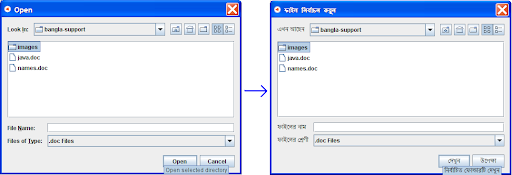
Next I had to set message values for properties as mentioned in Adrian's blog. However I had to set a couple of extra properties also
UIManager.put("FileChooser.directoryOpenButtonText");
UIManager.put("FileChooser.directoryOpenButtonToolTipText");
Finally there was this trouble of changing the tooltip for the home directory. The default JFileChooser implementation sets the tooltip to the name of the home directory which in my case (as will be in most cases :) ) was in english. So I had to end up writing a small visitor that would find the home folder button and reset the tooltip of the button as follows:
final String eHomeFolderName = eFileChooser.getFileSystemView().getHomeDirectory().getName();
MySwingComponentVisitor eVisitor = new MySwingComponentVisitor(eFileChooser, JButton.class) {
@Override
public boolean onComponentVisited(JComponent pVisitedComponent) {
JButton eButtonComponent = (JButton) pVisitedComponent;
if (eHomeFolderName.equals(eButtonComponent.getToolTipText())) {
eButtonComponent.setToolTipText(
getLocalizedMessage("homeFolderToolTipText"));
return STOP_VISITING;
}
return CONTINUE_VISITING;
}
};
eVisitor.visitComponents();
And the results were just so pleasing. A JFileChooser almost entirely in Bangla. Below are images showing how the JFileChooser transformed :)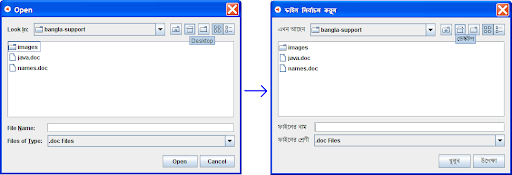
Thursday, March 6, 2008
Internationalize Swing's JFileChooser in Unicode (Bangla)
Posted by Shams at 12:40 5 comments
Labels: Bangla , Bengali , i18n , internationalization , JFileChooser , Unicode
Wednesday, February 27, 2008
Shell script to find last created file in a directory
I'm quite new to shell scripting and with my introduction to pipes and the beginners ls and tail commands I was able to come up with quite a simple shell script to find the last modified file in a directory.
The idea is very simple, its built on top of three facts :
1) ls -t -r command which sorts the file in a directory by creation date in reverse order,
2) tail -n 1 command which outputs the last line of the input passed to it, and
3) '' , the pipe which redirects the output of one process to the input of another.
So finally I came up with this simple script :)
ls -t -r | tail -n 1
Posted by Shams at 21:14 7 comments
Labels: last created file , script
Sunday, August 26, 2007
Cool way to create new Class in Eclipse
Recently I was amazed in how I could create a new class inside eclipse. All I needed to do was copy the source code for a class and paste, using Ctrl + V, into a selected package in eclipse. It automatically created a new java class and added the code to the file. I tired this same technique with another ide but failed to see the support there. I think this is a really cool feature provided by eclipse.
Posted by Shams at 21:32 3 comments
Labels: Eclipse new Class shortcut
Maven Plugin to generate code using Eclipse JDT
Recently we were facing troubles with the generated sources for our project. The problem was that the java sources generated for our web service client using cxf did not have a proper toString() or equals() method both of which we needed.
We were using maven for building our project and manage dependencies. The idea struck me why not have a maven plugin to modify the generated sources. So we decided on creating a maven plugin to do just that. I had previous experience with eclipse and knew it had something called JDT to form a syntax tree from java source text. In addition, maven build life cycle has a process-sources phase just after the generate-sources phase which was just perfect for us.
Now we have to plugin which generates the toString(), equals() and hashCode() methods and relieved us a lot of debugging effort.
Below is sample code generated using the plugin on a class:@Override public boolean equals( final Object pOtherObject){
if (pOtherObject == null) {
return false;
}
if
(this.getClass().equals(pOtherObject.getClass())) {
return id ==
((Event)pOtherObject).id;
}
return super.equals(pOtherObject);
}
@Override public int hashCode(){
return this.getId();
}
@Override public String toString(){
StringBuilder eStringBuilder;
eStringBuilder=new StringBuilder();
eStringBuilder.append("Class");
eStringBuilder.append(" : ");
eStringBuilder.append(getClass());
eStringBuilder.append(" , ");
eStringBuilder.append("Id");
eStringBuilder.append(" : ");
eStringBuilder.append(id);
eStringBuilder.append(" , ");
eStringBuilder.append("Artists");
eStringBuilder.append(" : ");
if (artists != null) {
eStringBuilder.append(" [ ");
for ( Artist eArtist : artists) {
if
(eArtist != null) {
eStringBuilder.append(eArtist);
} else {
eStringBuilder.append("null");
}
eStringBuilder.append(" , ");
}
eStringBuilder.append(" ] ");
} else {
eStringBuilder.append("null");
}
eStringBuilder.append(" , ");
eStringBuilder.append("Name");
eStringBuilder.append(" : ");
eStringBuilder.append(name);
eStringBuilder.append(" , ");
return
eStringBuilder.toString();
}
Posted by Shams at 20:33 6 comments
Labels: Eclipse JDT , Generated Classes , Maven Plugin , Method Injection

