Sunday, May 4, 2008

Implementation of My Java7 Wishlist

Last month I blogged about my java7 wishlist regarding collections. There I was redirected to a similar post by Stephen Colebourne and also introduced to an open source project kijaro where others had implemented their wishlists and I could try out mine.

After three weekends I am now pleased to announce that I have implemented my wishlist. My implementation at a branch of kijaro contains a merger of my wishlist and those mentioned by Stephen in his blog. Features implemented are:

  • Array Index access syntax for Lists and Maps
    myList[0] instead of myList.get(0) and
    myMap[“key”] instead of myMap.get(“key”)

  • Concise syntax to initialize and fill Collections
    new HashMap<Integer, String>(5) [1: “one”, 2:”two”, 3:”three”, ]
    instead of
    HashMap<Integer, String> m1 = new HashMap<Integer, String>(5);
    m1.put(1, “one”);
    m1.put(2, “two”);
    m1.put(3, “three”);

There was a catch while implementing the second feature as the expression needed to be converted to another expression and not a series of statements. Hence I needed to make use of a utility method to execute the set of statements to populate a Collection or a Map.


It was really exciting for me to see a .java file with the above syntax compiled into a .class file. Below is an example of such a file and the corresponding jdk4 compliant code it was converted to during the compilation process.

public class TestConcise {
public static void main(String[] args) {
boolean b = new java.util.LinkedList<String>()
["a", "b", "c" ].add("d");
param(new java.util.ArrayList<String>() {
public boolean add(String e) {
return super.add(e);
}
} ["a", "b", "c" ]
);
java.util.Map<Integer, String> m1 = ret();
m1[2] = "two";

java.util.LinkedList<String> l1 = new
java.util.LinkedList<String>()["a", "b", "c" ];
m1[3] = l1[2];
l1[0] = m1[0];
l1[1] = "one";

}

private static void param(
final java.util.Collection<? extends Object> coll){
System.out.println(coll);
}

private static java.util.Map<Integer, String> ret() {
return new java.util.HashMap<Integer, String>() {}
[1:"a", 2:"b", ];
}
}

was converted to


class TestConcise$1 extends java.util.ArrayList {
TestConcise$1() {
super();
}

public boolean add(String e) {
return super.add(e);
}

/*synthetic*/ public boolean add(Object x0) {
return this.add((String)x0);
}
},

class TestConcise$2 extends java.util.HashMap {
TestConcise$2() {
super();
}
},

public class TestConcise {
public TestConcise() {
super();
}

public static void main(String[] args) {
boolean b = java.util.CollectionUtil.fillCollection(
new java.util.LinkedList(),
new String[]{"a", "b", "c"}).add("d");
param(java.util.CollectionUtil.fillCollection(
new TestConcise$1(), new String[]{"a", "b", "c"}));
java.util.Map m1 = ret();
m1.put(Integer.valueOf(2), "two");

java.util.LinkedList l1 =
java.util.CollectionUtil.fillCollection(
new java.util.LinkedList(),
new String[]{"a", "b", "c"});
m1.put(Integer.valueOf(3), l1.get(2));
l1.set(0, m1.get(Integer.valueOf(0)));
l1.set(1, "one");

}

private static void param(
final java.util.Collection coll) {
System.out.println(coll);
}

private static java.util.Map ret() {
return java.util.CollectionUtil.fillMap(
new TestConcise$2(),
new Integer[]{Integer.valueOf(1), Integer.valueOf(2)},
new String[]{"a", "b"});
}
}
--

Saturday, April 5, 2008

My Java7 Wishlist regarding Collections

Update: I've implemented the features mentioned below. Read more about it at another post: Implementation of My Java7 Wishlist

There are tons of feature requests for java7. Most of the them center around closures, super-packages, extension methods, tuples, etc which are all new concepts for the language. I have been wondering why no one has bothered with improving support for some of the existing concepts/classes – in particular the syntax regarding Collection classes.

Collections have been a hot topic, although indirectly, with the introduction of generics in java 5. These classes are used more and more often in daily development – at least by me J and all my colleagues. So I am considering proposing giving the Collections citizens of java additional privileges like Arrays have receive right from the start. My wish list features mainly around syntactic enhancements to improve readability and make the code more concise (inspired by Rob’s CICE).

My first proposal revolves around making the collection instantiation syntax.
For a Collection class we might consider something similar to arrays:

Instead of:

Collection<String> c = new ArrayList();
c.add(“one”);
c.add(“two”);
c.add(“three”);

Use:

Collection<String> c = new ArrayList {“one”, “two”, “three” };

For a Map instance we might consider the javascript like syntax:

Instead of:

Map<String, Integer> m = new HashMap();
m.put(“one”, 1);
m.put(“two”, 2);
m.put(“three”, 3);

Use:

Map<String, Integer> m = new HashMap { “one”:1, “two”:2, “three”:3 };

However it becomes tricky when we wish to invoke a particular conctructor of the actual implementing class. I am yet to come up with a pretty format for that one but something like

Collection<String> c = new ( ArrayList(3) ) { “one”, “two”, “three” };
Map<String, Integer> m = new ( HashMap(5, 0.8) ) { “one”:1, “two”:2, “three”:3 };

should work fine.

My second proposal is to allow syntax to treat Maps like Arrays. After all Maps are Associative Arrays J.
So one should be able to write

m[“four”] = 4;
int i = m[“two”] ;

instead of

m.put(“four”, 4);
int i = m.get(“two”);


These help make the code compact and more readable.

I would be glad if you shared with me what you think of this proposal or if you have any similar ideas.

Update: I've implemented the features mentioned above. Read more about it at another post: Implementation of My Java7 Wishlist

--

Thursday, March 6, 2008

Internationalize Swing's JFileChooser in Unicode (Bangla)

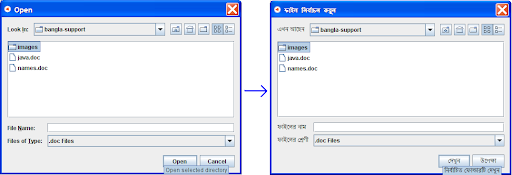
Recently I had to develop a small demo application for one of the leading newspapers in Bangladesh. I decided to localize my application and see all messages in Bangla. Searching Google I came across this article “Internationalization for Swing standard components”. This set me off in the right direction. However, there were some little tweaks I had to perform to get Bangla working. Firstly I had to set the font for the components user in JFileChooser.

final Font FONT_SOLAIMAN_LIPI = new Font("SolaimanLipi", Font.PLAIN, 15);
final FontUIResource eFontUIResource = new FontUIResource(FONT_SOLAIMAN_LIPI);
UIManager.put("Button.font", eFontUIResource);
UIManager.put("ToolTip.font", eFontUIResource);
UIManager.put("Label.font", eFontUIResource);
UIManager.put("EditorPane.font", eFontUIResource);
UIManager.put("TableHeader.font", eFontUIResource);


Next I had to set message values for properties as mentioned in Adrian's blog. However I had to set a couple of extra properties also

UIManager.put("FileChooser.directoryOpenButtonText");
UIManager.put("FileChooser.directoryOpenButtonToolTipText");


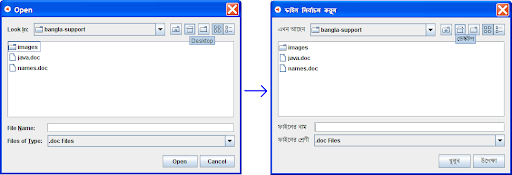
Finally there was this trouble of changing the tooltip for the home directory. The default JFileChooser implementation sets the tooltip to the name of the home directory which in my case (as will be in most cases :) ) was in english. So I had to end up writing a small visitor that would find the home folder button and reset the tooltip of the button as follows:

final String eHomeFolderName = eFileChooser.getFileSystemView().getHomeDirectory().getName();
MySwingComponentVisitor eVisitor = new MySwingComponentVisitor(eFileChooser, JButton.class) {
@Override
public boolean onComponentVisited(JComponent pVisitedComponent) {
JButton eButtonComponent = (JButton) pVisitedComponent;
if (eHomeFolderName.equals(eButtonComponent.getToolTipText())) {
eButtonComponent.setToolTipText(
getLocalizedMessage("homeFolderToolTipText"));
return STOP_VISITING;
}
return CONTINUE_VISITING;
}
};
eVisitor.visitComponents();


And the results were just so pleasing. A JFileChooser almost entirely in Bangla. Below are images showing how the JFileChooser transformed :)


Click to enlarge
Click to enlarge

--

Wednesday, February 27, 2008

Shell script to find last created file in a directory

I'm quite new to shell scripting and with my introduction to pipes and the beginners ls and tail commands I was able to come up with quite a simple shell script to find the last modified file in a directory.

The idea is very simple, its built on top of three facts :
1) ls -t -r command which sorts the file in a directory by creation date in reverse order,
2) tail -n 1 command which outputs the last line of the input passed to it, and
3) '' , the pipe which redirects the output of one process to the input of another.

So finally I came up with this simple script :)

ls -t -r | tail -n 1

--